
If you're looking at ChatGPT and thinking, "This could save my team time, but I still can't justify paying for another tool," you're asking the right question. Most businesses don't fail with AI because the tool is weak. They fail because they start with scattered experiments, no rules, and no way to tell whether the output is worth the cost.
That's the gap in most advice about how to use ChatGPT for business. It usually stops at time-saving ideas and never gets to the hard part: what you should automate first, what should stay human, how to protect business data, and how to tell if the subscription is paying for itself. Even broad business coverage has noted that content on ChatGPT often emphasizes efficiency but doesn't give owners enough help on ROI, subscription trade-offs, or breakeven thinking for small teams, leaving a real gap between hype and financial decision-making (Entrepreneur's discussion of ChatGPT time-saving use cases).
Used properly, ChatGPT can become a drafting engine, analyst, workflow assistant, and internal knowledge layer. Used badly, it becomes a fast way to generate bland copy, confident mistakes, and privacy headaches. If you're still comparing options, it's also worth reviewing broader AI tools for business because ChatGPT is often strongest when it sits inside a wider stack rather than replacing every tool you already trust.
Table of Contents
- Unlocking Business Potential with ChatGPT
- Your First Steps with ChatGPT for Business
- From Simple Questions to Powerful Commands
- Practical ChatGPT Applications Across Your Business
- Integrating ChatGPT into Your Business Systems
- Tracking Success and Managing Business Risk
- Frequently Asked Questions About ChatGPT in Business
Unlocking Business Potential with ChatGPT
The businesses getting value from ChatGPT aren't using it as a novelty chatbot. They're using it where work is repetitive, language-heavy, and slow to move through the team. That usually means draft creation, document cleanup, summarization, spreadsheet analysis, research preparation, customer response support, and internal documentation.
The practical value isn't "AI wrote something." The value is that one person can move a task from blank page to usable first draft quickly, then spend human time on judgment. That distinction matters. ChatGPT is good at acceleration. It is not good at accountability.
Where it earns its keep
The strongest business use cases usually share three traits:
- The task repeats often: Weekly reports, product descriptions, proposal drafts, FAQ replies, and meeting summaries are good examples.
- The output has a known structure: If you know what a good result looks like, ChatGPT performs better.
- A human can review the work quickly: The best workflows keep approval and final decisions with your team.
Practical rule: Don't deploy ChatGPT first where errors are expensive. Deploy it first where review is fast.
That means your first win probably won't be "run the whole company with AI." It will be smaller. Draft outbound emails. Turn rough notes into client updates. Summarize support themes. Analyze a spreadsheet. Create first-pass policy documents that a manager cleans up.
What works and what doesn't
What works is narrow scope, clear standards, and a measurable process. What doesn't is giving staff a blank chat window and hoping they'll invent value on their own.
A lot of owners ask whether ChatGPT can replace staff. In my experience, that's the wrong lens. The useful question is whether it can remove low-value effort from skilled people so they can focus on sales calls, review, negotiation, customer relationships, compliance, and product decisions.
Use it as a multiplier, not a substitute for competence.
- Good fit: Marketing drafts, internal SOPs, support triage, spreadsheet analysis, research summaries
- Bad fit: Final legal advice, unsupervised financial judgments, direct publication without fact-checking, sensitive data pasted casually into the wrong environment
The businesses that stick with ChatGPT usually treat it like a junior assistant with speed and range, but no business judgment unless you provide it.
Your First Steps with ChatGPT for Business
A typical small-business rollout goes wrong before anyone writes a prompt. The owner tests ChatGPT on a personal account, a few staff copy the approach, someone pastes sensitive client information into the wrong workspace, and by the end of the week the team has mixed output quality and no clear rules. That is not an AI failure. It is a setup failure.

Pick the right plan before you prompt
Your first decision is not creative. It is operational. Choose the account tier based on risk, access, and who needs oversight.
Use Free for low-risk testing with public or throwaway material.
Use Plus if one person owns the workflow and needs stronger day-to-day capability, file uploads, and fewer usage constraints.
Use Team if several employees need shared access, business separation from personal accounts, and admin visibility.
For many small businesses, this is the first real ROI checkpoint. If only one person is experimenting, Plus may be enough. If three or four people are using ChatGPT every week, Team usually becomes easier to justify because account ownership, offboarding, and policy control stop being improvised. The cheaper plan is not always the lower-cost option if it creates review gaps or access problems later.
If you're following ongoing product updates, model changes, and feature shifts, keep an eye on dedicated ChatGPT product coverage for business users rather than assuming the product behaves the same way it did a few months ago.
Set up the account like a business tool
Treat rollout the same way you would treat a CRM, accounting platform, or password manager. Ownership, permissions, and data rules come first.
Create business-owned accounts
Use company email addresses. If an employee leaves, access should stay with the business.Write a simple data policy
State what staff can paste in and what stays out. Customer PII, contract details, internal financials, security information, and unreleased product plans should be covered clearly.Check workspace and training settings
Configure the environment to match your risk tolerance and internal policy before staff start using it for live work.Approve a short list of use cases
Start with three repeatable tasks tied to time savings or output quality. Good examples include sales follow-up drafts, support response drafts, and meeting-note summaries.Assign a reviewer
Every customer-facing or decision-support output needs a named person who signs off on it.
I have seen small teams waste weeks because nobody decided who owned the tool. Shared responsibility sounds reasonable, but in practice it means no one maintains prompts, no one updates policies, and no one tracks whether the software is saving time.
Use this comparison table as a reality check
| Feature | Free Plan | Plus Plan ($20/mo) | Team Plan ($25/user/mo) |
|---|---|---|---|
| Best for | Casual testing | Solo business use | Multi-user business use |
| Sensitive business work | Poor fit | Better with the right settings and review | Better fit for teams with oversight |
| Collaboration | Limited | Limited | Team-oriented |
| Custom workflows | Basic | Stronger | Stronger with shared business use |
| Admin control | Minimal | Minimal | Better workspace control |
| Recommendation | Only for low-risk trials | Good for freelancers and owners | Best starting point for small teams |
Use the table to make a finance decision, not just a software decision. Ask three questions: Who uses it? What data touches it? How expensive is a bad output? Those answers matter more than feature lists.
A clean first-week rollout
The first week should produce evidence, not excitement. Keep the scope narrow enough that you can measure whether ChatGPT saves time, improves consistency, or reduces low-value admin work.
- Day one: Choose the plan, set account ownership, and define banned data.
- Day two: Build prompt templates for one workflow with a clear owner.
- Day three: Compare AI output against your current standard for speed and quality.
- Day four: Run live tasks with human approval on every result.
- Day five: Review what worked, where output drifted, and whether the time saved justifies continued use.
That process gives you something many AI rollouts never produce: a business case. If the trial saves an hour a week and creates review headaches, stop there. If it saves several hours in a controlled workflow with low correction effort, expand carefully. That is how small businesses get value from ChatGPT without taking on sloppy risk.
From Simple Questions to Powerful Commands
A small business owner sits down to use ChatGPT for the first real task of the day. They paste in "write a customer email" and get bland copy that sounds like everyone else. Ten minutes later they try again with the audience, offer, objections, brand tone, and required call to action. The second draft is usable.
That gap matters because prompt quality affects whether ChatGPT saves time or creates more review work. In client deployments, I do not treat prompting as a writing trick. I treat it as workflow design. If the instruction is loose, the output drifts. If the instruction is specific, the output becomes easier to review, reuse, and measure.

Teams usually do not need more AI tools at this stage. They need a repeatable way to ask for work product that matches the business standard closely enough to be worth using. The goal is not clever prompts. The goal is lower edit time, fewer misses, and more consistent output across staff.
A prompt framework that works in practice
Use this five-part structure:
Role
Tell ChatGPT what job it is doing. Example: "Act as a B2B email strategist."Task
State the deliverable. Example: "Draft a follow-up email for leads who downloaded our guide."Context
Add the facts that affect the answer. Include audience, product details, tone, objections, limits, approval rules, and any compliance notes.Format
Specify the shape of the output. Ask for a memo, checklist, table, short email, FAQ, script, or headline set.Standard
Give it a sample, a style guide, or success criteria so the model knows what "good" looks like.
This framework is plain. Plain is useful. Staff can learn it quickly, managers can review it, and prompt quality stops depending on whoever happens to be best at improvising.
Before and after examples by department
Marketing
Weak prompt:
"Help with marketing."
Better prompt:
"Act as a content strategist for a cybersecurity software company. Create a one-week LinkedIn content plan for IT managers at small businesses. Focus on phishing risk, password hygiene, and employee awareness. Format the result as a table with post angle, hook, CTA, and one suggested visual per post. Keep the tone clear, professional, and non-hyped."
HR
Weak prompt:
"Write an onboarding doc."
Better prompt:
"Act as an HR operations manager. Draft a remote employee onboarding checklist for a 15-person company. Include first-day setup, security basics, communication norms, manager check-ins, and probation review points. Format it as a checklist with sections for HR, IT, manager, and employee."
Operations
Weak prompt:
"Summarize this meeting."
Better prompt:
"Act as a chief of staff. Summarize these meeting notes for the leadership team. Extract decisions, unresolved issues, owners, deadlines, and risks. Format the output as an executive summary followed by an action table."
If staff capture tasks on the go, shorter voice-driven inputs can still work if they include the basics. Audience, task, constraint, and format. Some of the same habits show up in these ChatGPT tricks on iPhone for faster input capture, which is useful when sales reps, founders, or service teams are working from mobile.
How to improve weak output fast
Do not throw out the first draft too quickly. Tighten the instruction and make the model revise against a clearer standard.
Use follow-ups like these:
- Tighten the audience: "Rewrite for a buyer who is skeptical and time-poor."
- Change the structure: "Turn this into a pros and cons table."
- Add a constraint: "Keep this under 180 words and avoid jargon."
- Force relevance: "Use the uploaded notes only. Don't add outside claims."
- Raise the standard: "Make this sound like a capable operations manager, not generic marketing copy."
The first response often exposes gaps in the request. That is useful. It shows what your team forgot to specify.
This is also the point where prompt libraries start paying off. If a service manager has a prompt that consistently turns messy call notes into a clean customer summary, save it. If the finance lead has one that produces a reliable draft variance explanation, save that too. Shared prompts reduce training time and make AI output easier to compare across people and departments. They also support the bigger business case. Consistency makes ROI easier to measure.
A short video primer can also help teams see what strong instruction design looks like before they begin using it at work.
A simple standard for staff
Give employees this rule: If the prompt wouldn't make sense to a new hire, it isn't ready for ChatGPT.
That one test catches a lot. Missing context. Unclear ownership. Vague success criteria. Hidden assumptions.
Once a team learns to write instructions this way, ChatGPT becomes easier to audit as well as easier to use. That matters in a business setting. Better prompts do not just improve output quality. They cut rework, make approvals faster, and give you a fairer way to judge whether a workflow is worth rolling out further.
Practical ChatGPT Applications Across Your Business
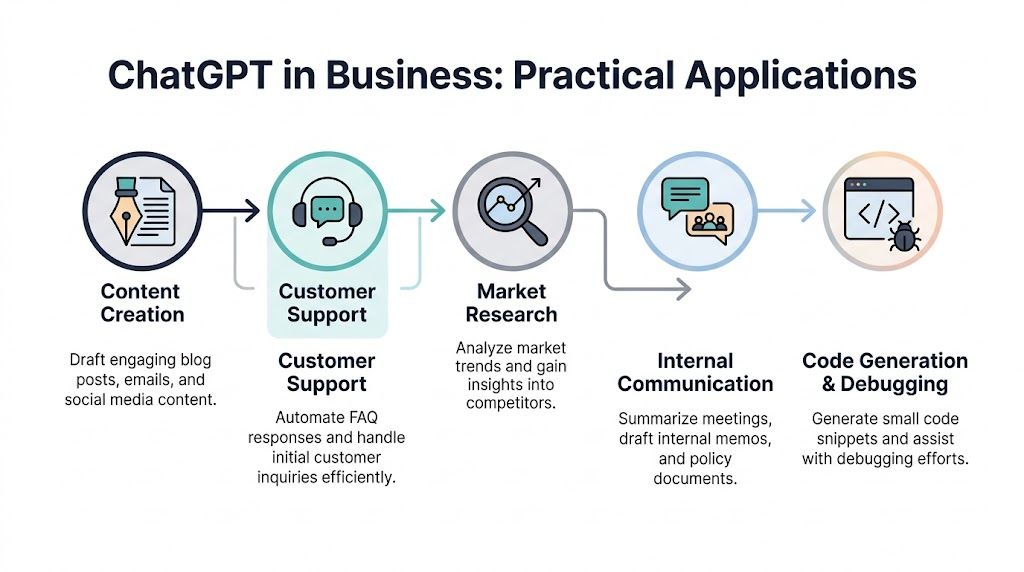
The easiest way to understand how to use ChatGPT for business is to look at workflows, not feature lists. In practice, teams don't need "AI transformation." They need one recurring problem solved well enough that the change sticks.
Marketing that starts with structure
A small marketing team usually hits the same wall. They have ideas, some product knowledge, scattered customer questions, and no time to turn that into clean content across multiple channels.
A workable ChatGPT workflow looks like this:
- Input: Product notes, customer pain points, editorial tone guide, target audience
- Prompt: "Draft three angles for a blog post, email, and LinkedIn post from the same source material. Keep each one distinct."
- Human review: Remove generic claims, add product specifics, verify facts
- Output: One approved draft pack instead of three separate blank-page sessions
ChatGPT particularly shines by helping you turn one source document into several usable content assets without forcing staff to start from zero every time.
Good marketing use isn't "write me a blog post." It's "turn approved business knowledge into channel-ready drafts."
Sales and support that stay useful
Sales teams often waste time rewriting the same outreach with tiny variations. Support teams lose time drafting similar responses to common issues.
For sales, ChatGPT works best as a personalization layer. Give it the lead source, buyer role, known pain point, and desired action. Ask for three outreach variations with different tones. Then let the rep choose and edit.
For support, use it to produce first drafts, not unsupervised replies. A useful workflow is:
- Paste the customer question.
- Include the approved policy or help center excerpt.
- Ask ChatGPT to draft a response in company tone.
- Require a human to check accuracy before sending.
That keeps speed without handing customer trust to a model.
Operations and analysis that used to bottleneck teams
Operations teams get huge value from summarization, SOP drafting, and data analysis. In these applications, ChatGPT moves beyond copy generation and becomes truly practical.
A strong example comes from ChatGPT's Data Analysis mode. In one documented retail superstore analysis, ChatGPT processed 9,994 sales records and calculated total sales of $2,297,200.86, total profit of $286,397.02, and an overall gross margin of approximately 12.5%, giving a fast operational snapshot without requiring coding (documented sales dataset analysis in ChatGPT).
That matters because many small businesses already have data. They just don't have an analyst available every time someone asks a basic question.
Here are three workflows that work well:
- Spreadsheet diagnosis: Upload a CSV and ask for top-line metrics, trends, outliers, and missing-data warnings.
- Policy drafting: Paste notes from managers and ask for a first draft of an internal process document.
- Meeting compression: Turn long notes into decisions, owners, and unresolved issues.
A business owner can upload a sales export and ask:
Analyze this file for total sales, total profit, margin patterns, strongest categories, weak regions, and any unusual trends. Present the result as an executive summary, then a table of findings, then charts.
That type of prompt is more useful than "What does this spreadsheet say?" because it tells the model what kind of judgment the business needs.
The key trade-off is simple. ChatGPT can reduce analyst-style grunt work, but it won't know your business context unless you add it. If margin is less important than retention, say so. If one region matters more because of a new launch, say so. Better input produces better analysis.
Integrating ChatGPT into Your Business Systems
Significant value is gained when ChatGPT stops being a tab people visit occasionally and starts becoming part of the workflow. At that point, you're not asking staff to "remember to use AI." You're designing a system where drafting, summarizing, categorizing, or routing happens with less manual effort.

Three integration levels that make sense
There are three sensible levels of adoption.
Level one is manual use.
A person copies notes into ChatGPT, gets a draft, edits it, and publishes or sends it.
Level two is connected automation.
A no-code tool like Zapier can trigger actions between your forms, CRM, inbox, and chat tools. For example, a new support submission can be summarized automatically and sent to Slack with a proposed internal response.
Level three is API or custom GPT deployment. At this level, ChatGPT becomes specialized. You connect it to business documents, internal standards, and recurring workflows.
Most small businesses should not start at level three. They should earn their way there by proving that the manual workflow already works.
How custom GPTs fit into the stack
Custom GPTs are useful when the same type of work happens repeatedly and the team needs consistent structure. Think of a product review draft assistant, proposal writer, onboarding doc helper, or competitor analysis bot.
OpenAI's SMB guidance has noted that small teams have reported 2-3x productivity gains in creating marketing materials by using custom, tool-connected GPTs, and that fine-tuning on business-specific language can improve relevance by as much as 40% (OpenAI SMB guide on custom GPT productivity).
Those gains don't come from magic. They come from narrowing the job.
A useful custom GPT setup usually includes:
- Approved source documents: Tone guide, product specs, FAQ, compliance notes, examples of good output
- A narrow role: "Brand voice editor" is better than "marketing assistant"
- Clear forbidden behavior: No invented claims, no unsupported comparisons, no policy advice beyond source docs
- A fixed output format: Tables, summaries, checklists, or draft templates
If you're already comparing workflow platforms and connected tools, broader coverage of business automation tools can help you decide whether a no-code layer, native integration, or a custom build is the better fit.
A sensible rollout path
Don't build a custom GPT because it's fashionable. Build one when you can answer these questions:
- What repeated task are we standardizing?
- What source material will ground the output?
- Who owns review and maintenance?
- What does a good output look like?
- What business system should it connect to, if any?
One practical sequence is this:
- Prove the prompt manually.
- Save the successful prompt and source files.
- Turn it into a repeatable internal workflow.
- Only then connect it to tools or build a custom GPT.
That path prevents a common mistake. Teams automate a weak workflow, then wonder why they get weak output faster.
Tracking Success and Managing Business Risk
If you can't show what changed after adopting ChatGPT, the discussion turns into opinion. One person thinks it's saving time. Another thinks it's creating cleanup work. Both may be partly right.
The fix is straightforward. Track impact at the task level.
What to measure first
Start with one workflow and compare before and after. Not everything needs a spreadsheet, but every pilot needs a baseline.
A documented enterprise example is useful here. In one case, ChatGPT Enterprise was associated with a 20% reduction in document drafting time for an R&D team, and internal analysis estimated that delivering projects two weeks faster translated into $50,000 in extra quarterly revenue (documented business impact example for ChatGPT Enterprise).
Most small businesses won't have metrics that clean on day one. That's fine. Start with operational measures you can observe.
- Time saved: How long did a task take before versus after?
- Throughput: Are you producing more approved outputs in the same workweek?
- Quality control load: Is review faster, or are editors spending more time fixing weak drafts?
- Cost avoidance: Did AI reduce external drafting, admin, or analysis work?
- Revenue support: Did faster response, quicker proposal delivery, or smoother content production help move business faster?
Track one task for one month. That's more useful than debating AI strategy in the abstract.
If you're using ChatGPT in any workflow touching identity, customer data, or internal systems, keep security implications in view. Broader reporting on how AI is affecting identity and data security is a useful reminder that efficiency and risk rise together.
What your AI policy should actually say
A useful internal AI policy is short, specific, and enforced. It shouldn't read like legal theatre.
Include these points:
Approved tools and plans
State which version of ChatGPT the company permits for business use.Data handling rules
Define what employees may never paste into the tool.Human review requirement
Set clear rules for who must review external content, customer responses, and sensitive internal outputs.Fact-checking standard
Require verification for any factual claim, legal statement, pricing reference, or comparative claim.Ownership and accountability
The employee using the tool remains responsible for the output.Use-case boundaries
Spell out where AI may assist and where it may not act independently.
The businesses that manage AI risk well aren't the ones with the longest policy. They're the ones that connect policy to daily behavior.
Frequently Asked Questions About ChatGPT in Business
Can ChatGPT be trusted with business-critical work
Not on its own. It can assist with business-critical work, but it shouldn't be the final authority. The practical standard is simple: use ChatGPT for drafting, organizing, summarizing, and pattern spotting, then let a qualified human approve anything that affects customers, finances, contracts, compliance, or brand claims.
If the cost of being wrong is high, review has to be part of the workflow.
What about privacy with integrations and plugins
Privacy risk increases as your setup gets more connected. A simple standalone drafting workflow is easier to govern than a chain of CRM, automation tools, shared drives, and plugins.
Keep your rule set tight:
- Use approved tools only
- Limit who can connect external systems
- Review what data each integration can access
- Avoid passing sensitive material unless the setup has been approved internally
The convenience of automation isn't worth much if nobody can explain where the data went.
What skills should teams build now
The most useful skills aren't "AI skills" in the abstract. They're operational skills.
Train staff to do these things well:
- Write precise prompts
- Judge output quality
- Spot unsupported claims
- Use source documents to ground responses
- Know when not to use the tool
That last one matters more than people think. Mature AI use means knowing where the model is helpful and where human expertise still has to lead.
Will ChatGPT replace jobs in small businesses
Usually it changes task design before it changes headcount. It removes portions of work that are repetitive, language-heavy, or slow to draft. Teams that adapt well tend to shift people toward review, exception handling, customer interaction, and decision-making.
In practical terms, it often changes what a role spends time on before it changes whether the role exists.
What's the best first use case
Start where three conditions are true:
- The task repeats often
- The output has a recognizable format
- A human can review it quickly
That usually means content drafts, support response drafts, meeting summaries, internal SOPs, or spreadsheet analysis.
The best first use case isn't the most ambitious one. It's the one your team will keep using because it works.
Tech changes fast, but practical judgment lasts longer. If you want more tested guidance on AI platforms, privacy tools, and the software decisions that affect real buyers, follow Tech Verdict. What's the first business workflow you'd trust ChatGPT to handle this week?