
Wednesday, May 27, 2026
techverdict
  • Home
  • Artificial Intelligence
    • ChatGPT
    • Claude
    • Gemini
    • Perplexity
  • Cybersecurity
    • Antivirus & Malware Protection
    • Network and Firewall Security
    • Password Managers
    • VPN
    • Identity & Data Protection
  • Smart home
    • Alexa
    • Google Home
    • Matter
  • Technology
    • Desktop
    • Laptop
    • Smartwatches
    • Phones
  • Review
    • VPN
No Result
View All Result
SAVED POSTS
techverdict
  • Home
  • Artificial Intelligence
    • ChatGPT
    • Claude
    • Gemini
    • Perplexity
  • Cybersecurity
    • Antivirus & Malware Protection
    • Network and Firewall Security
    • Password Managers
    • VPN
    • Identity & Data Protection
  • Smart home
    • Alexa
    • Google Home
    • Matter
  • Technology
    • Desktop
    • Laptop
    • Smartwatches
    • Phones
  • Review
    • VPN
No Result
View All Result
techverdict
No Result
View All Result

Unlock Lyria 3: Simple Steps to Powerful Results

in Artificial Intelligence, Gemini
Reading Time: 2 mins read
A A
0
Unlock Lyria 3: Simple Steps to Powerful Results
291
SHARES
1.6k
VIEWS
Share to XShare to LinkedinShare to Pinterest

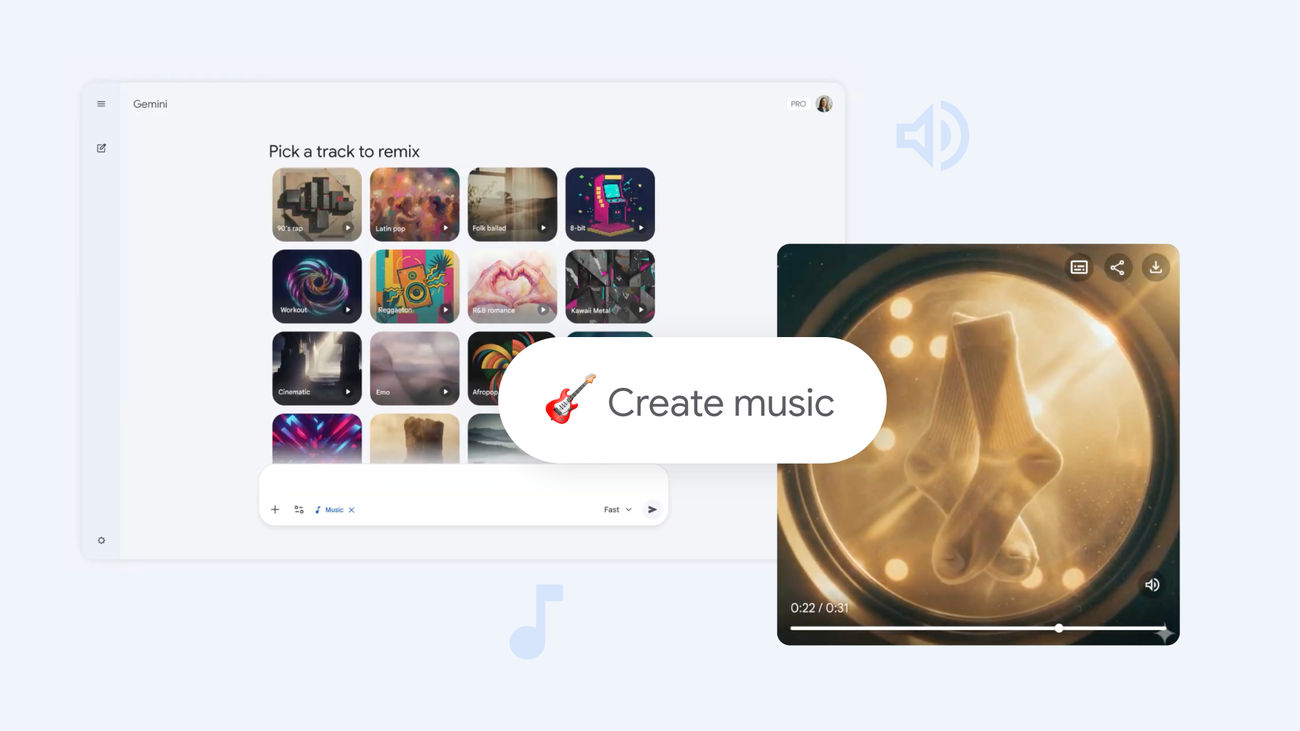
Tips for using Google DeepMind’s Lyria 3

1. Begin with text

Unleash your creativity with Lyria 3 by starting with a simple text prompt. Describe the kind of track you’re envisioning – lyrics or instrumentals are both fair game! For example, you could type: “Craft a song that captures the essence of my mom’s signature dish: rice, plantains, and beans. Make it an Afrobeats track with a West African vocalist.” Or, transform any idea, topic, or private joke into a unique musical creation. Imagine telling your roommate to do the dishes with a “90s skate punk rock track – high-energy with lightning-fast drums.”

2. Upload an image or video

Looking for a more visual approach? Lyria empowers you to use images or videos as your muse. Upload your favorite vacation pictures, snapshots of your pet, or even your own artistic creations. Lyria analyzes the visuals – taking cues from the subjects, their attire, the background, and more – to generate music that perfectly complements the scene.

3. Define the genre and era

Stuck on where to begin? Don’t worry – start with the basics! Lyria boasts an impressive range of genres and eras, from ’90s hip-hop to 2000s pop. Get adventurous and blend different styles within a single composition. How about a catchy K-pop song with a touch of Motown? Or perhaps a funk track elevated by classical violins? The possibilities are endless.

4. Add details like instruments, song dynamics and vocals

If you choose a genre and era like “1950s jazz,” saxophones and trumpets will likely take center stage. However, you can always inject your personal touch by incorporating additional instruments, such as an ’80s synth, to add depth to your sound. If you leave the instruments unspecified, Lyria will intelligently select instruments that align with the chosen genre. Furthermore, you have control over the song’s structure. Picture a gentle piano melody building into an explosive chorus, or a purely instrumental interlude. Lyria can also generate vocals. Specify whether you want a male or female vocalist, and indicate their vocal range (baritone or soprano). You can even create a full choir! Experiment with descriptive terms like “rich,” “gravelly,” “soulful,” or “breathy” to shape the vocal style. Explore layering different vocal styles, like vocals gradually becoming quieter or splitting into harmonies.

5. Write your own lyrics — or ask Lyria to handle it

Want to showcase your songwriting skills? Use the prefix “Lyrics:” to include your own lyrics (remember to keep them concise, as tracks are limited to 30 seconds!). To create background vocals that echo the main melody, incorporate parentheses like this: “Lyrics: Let’s go (go).” Alternatively, allow Lyria 3 to craft lyrics for you by providing a clear theme in your prompt. Request “a love song,” “a song about success,” or even a personalized “new happy birthday song” for a friend.

6. Share your tracks

Sharing your Lyria 3 creations is incredibly simple. Just download your track as an MP3 or MP4 and post it on social media or send it via text. Guaranteed to inject some excitement into any conversation – give it a try today!



Read the full article at the source

Tags: Gemini
Tweet73Share20Pin26
TechVerdict

TechVerdict

Related Stories

Abstract neural network with glowing nodes and energy flows.

Google Unveils Gemini 3.1 Pro: A Leap in AI Reasoning Power

by Stefan Hartvig

Google has surprised the tech world with the launch of Gemini 3.1 Pro, an advanced AI model designed to tackle complex, multi-step problems that have previously stumped many...

Unlock the Power of 3: Galaxy S26 AI Assistants You Can Actually Use

Unlock the Power of 3: Galaxy S26 AI Assistants You Can Actually Use

by TechVerdict

Samsung Galaxy S26 Series to Debut With Three AI Assistants, Revamped Bixby Get ready for a smartphone experience unlike any other! Samsung is poised to revolutionize how you...

ChatGPT vs Claude vs Gemini: The 2026 AI Champion

ChatGPT vs Claude vs Gemini: The 2026 AI Champion

by TechVerdict

ChatGPT is no longer the default winner by momentum alone. Its traffic share fell from 86.7% to 64.5% in the 12 months leading into 2026, a 22.2 percentage...

How to Use ChatGPT for Business: A Practical Guide

How to Use ChatGPT for Business: A Practical Guide

by TechVerdict

If you're looking at ChatGPT and thinking, "This could save my team time, but I still can't justify paying for another tool," you're asking the right question. Most...

Next Post
Unlock the Power of 3: Galaxy S26 AI Assistants You Can Actually Use

Unlock the Power of 3: Galaxy S26 AI Assistants You Can Actually Use

Recommended

“Experts Warn: ChatGPT Health Misidentifies Critical Medical Emergencies, Raising Safety Concerns”

“Experts Warn: ChatGPT Health Misidentifies Critical Medical Emergencies, Raising Safety Concerns”

How to Protect Online Privacy: A Guide to Securing Your Digital Life in 2026

How to Protect Online Privacy: A Guide to Securing Your Digital Life in 2026

Popular Story

  • ExpressVPN Review

    ExpressVPN Review: Everything You Need to Know Before Signing Up

    300 shares
    Share 120 Tweet 75
  • NordVPN Review: Secure Your Online Privacy with This Leading VPN

    299 shares
    Share 120 Tweet 75
  • Unlocking the Smart Speaker Secret: Simple Guide to Choosing the Right One (2026)

    295 shares
    Share 118 Tweet 74
  • Unlock Lyria 3: Simple Steps to Powerful Results

    291 shares
    Share 116 Tweet 73
  • Unlocking the Galaxy S26 Price Mystery: What You’ll *Actually* Pay

    291 shares
    Share 116 Tweet 73
The Lates Tech and AI News, Tests and Reviews | Tech Verdict

© 2026 | Techverdict

Navigation

  • About Us
  • Cookie Policy
  • Contact
  • Disclaimer
  • Privacy Policy

Follow Us

Welcome Back!

Login to your account below

Forgotten Password?

Retrieve your password

Please enter your username or email address to reset your password.

Log In
No Result
View All Result
  • Artificial Intelligence
    • ChatGPT
    • Claude ai
    • Gemini
    • Perplexity
  • Cybersecurity
    • Antivirus & Malware Protection
    • Identity & Data Protection
    • Network and Firewall Security
    • Password Managers
    • VPN
  • Review
    • VPN
  • Smart Home
    • Alexa
    • Google Home
    • Matter
  • Technology
    • Desktop
    • Laptop
    • Phones
    • Smartwatches

© 2026 | Techverdict