
Sunday, July 26, 2026
techverdict
  • Home
  • Artificial Intelligence
    • ChatGPT
    • Claude
    • Gemini
    • Perplexity
  • Cybersecurity
    • Antivirus & Malware Protection
    • Network and Firewall Security
    • Password Managers
    • VPN
    • Identity & Data Protection
  • Smart home
    • Alexa
    • Google Home
    • Matter
  • Technology
    • Desktop
    • Laptop
    • Smartwatches
    • Phones
  • Review
    • VPN
No Result
View All Result
SAVED POSTS
techverdict
  • Home
  • Artificial Intelligence
    • ChatGPT
    • Claude
    • Gemini
    • Perplexity
  • Cybersecurity
    • Antivirus & Malware Protection
    • Network and Firewall Security
    • Password Managers
    • VPN
    • Identity & Data Protection
  • Smart home
    • Alexa
    • Google Home
    • Matter
  • Technology
    • Desktop
    • Laptop
    • Smartwatches
    • Phones
  • Review
    • VPN
No Result
View All Result
techverdict
No Result
View All Result

Unlock Gemini’s Android App Superpowers: A Simple Guide

in Technology
Reading Time: 3 mins read
A A
0
Unlock Gemini’s Android App Superpowers: A Simple Guide
288
SHARES
1.6k
VIEWS
Share to XShare to LinkedinShare to Pinterest

Google Details ‘AppFunctions’: Unleashing Gemini’s Power Within Your Android Apps

Exciting news for Android developers! Following the recent buzz around Gemini automation, Google is now revealing the inner workings of how this groundbreaking technology will interact with your apps.

Google is rolling out early-stage developer tools designed to seamlessly connect your applications with intelligent, agent-driven platforms like Google Gemini. This opens up a world of possibilities for personalized assistant experiences.

We’re in the initial beta phases of this endeavor, and we’re committed to building these features with privacy and security as cornerstones. This represents our first step into exploring a significant shift in the app ecosystem.

AppFunctions

Android is adopting a dual approach, with AppFunctions leading the charge. While initially teased last year, the full scope of AppFunctions is now being unveiled.

AppFunctions is an Android 16 platform feature, backed by a dedicated Jetpack library, allowing apps to expose specific functionalities. These functions can be securely accessed and executed by authorized callers, including agent apps.

Essentially, developers can now define their app’s key features as tools that AI assistants, like Gemini, can utilize directly. Think of AppFunctions as a local version of the Model Context Protocol (MCP) used for agents and server-side tasks, but operating entirely on the user’s Android device. Consider these potential applications:

Advertisement – scroll for more content


  • Task management and productivity
    • User request: “Set a reminder to collect my package from work at 5 PM today.“
    • AppFunction action: The system identifies your preferred task management app and uses its function to create a new task. The title, time, and location are automatically filled in based on your spoken request.
  • Media and entertainment
    • User request: “Make a new playlist featuring the hottest jazz albums of the year.“
    • AppFunction action: The system directly interacts with your music app, executing a playlist creation command. It uses the request as a search query to find and add the relevant music, instantly launching your personalized playlist.
  • Cross-app workflows
    • User request: “Grab that noodle recipe from Lisa’s email and add all the ingredients to my shopping list.“
    • AppFunction action: This complex request utilizes functions from multiple apps. First, the system searches your email app for the recipe. Then, it pulls out the ingredient list and adds them to your preferred shopping list app.
  • Calendar and scheduling
    • User request: “Schedule Mom’s birthday party in my calendar for next Monday at 6 PM.“
    • AppFunction action: The designated agent app uses the calendar app’s “create event” feature, intelligently parsing the date and time from your request. The event is automatically created, saving you the hassle of manual entry.

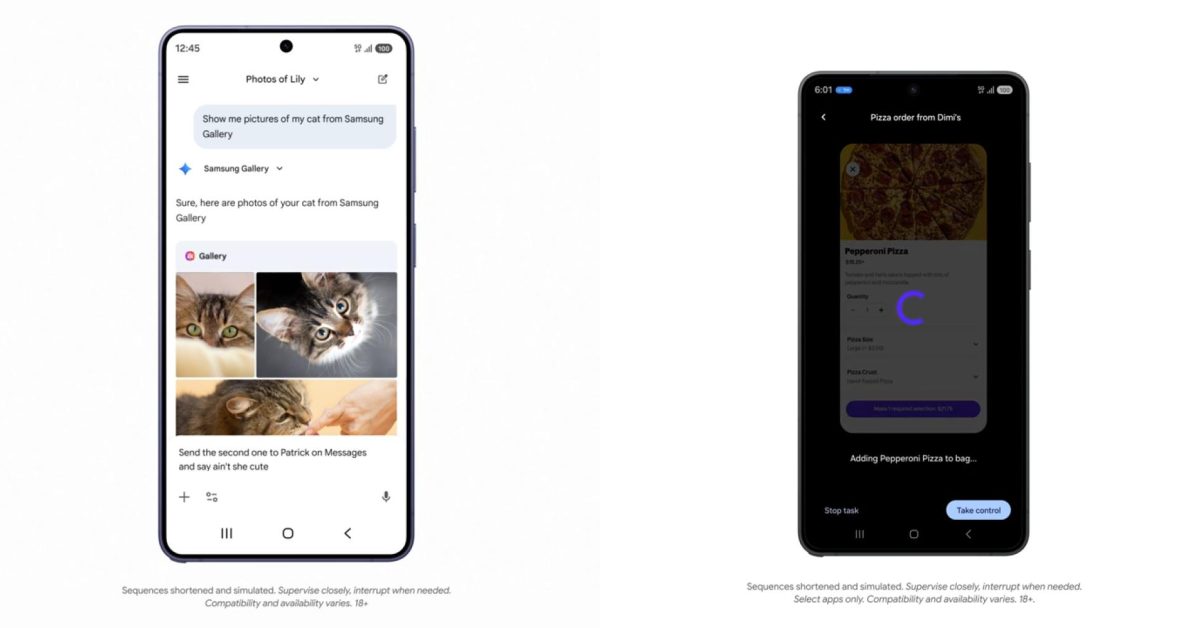
Check out how AppFunctions integrates with the Samsung Gallery app on the upcoming Galaxy S26. This feature is also planned for Samsung devices running OneUI 8.5 and newer.

Instead of endlessly scrolling, you can simply ask Gemini to “Show me pictures of my cat from Samsung Gallery.” Gemini understands the request, triggers the correct function within the Gallery app, and presents the photos directly within the Gemini interface – no app switching required! This seamless experience supports both voice and text input, and you can even use the displayed photos in subsequent conversations, such as sharing them via text message.

The Gemini app already leverages AppFunctions to power its Calendar, Notes, and Tasks integrations across Google apps and OEM default applications.

UI automation

Android is also pioneering a second method, exemplified by the Gemini automation revealed for the Galaxy S26 and Pixel 10 series earlier today.

While AppFunctions provides a structured, controlled way for apps to communicate with AI agents, we recognize that not every interaction currently has a dedicated integration.

Therefore, Google is crafting a UI automation framework that enables AI agents to intelligently perform general tasks within users’ installed apps.

This framework handles the complex work behind the scenes, allowing developers to easily extend their app’s reach with minimal coding effort. It’s a streamlined way to offer agentic capabilities without extensive engineering investments.


Google anticipates that Android 17 will “expand these capabilities, reaching a broader audience of users, developers, and device manufacturers.”

We’re currently collaborating with a select group of app developers to create exceptional user experiences as this ecosystem evolves. We plan to share more details later this year on how you can leverage AppFunctions and UI automation to integrate agentic capabilities into your app. Stay tuned for further updates!



Read the full article at the source

Tags: Technology
Tweet72Share20Pin26
TechVerdict

TechVerdict

Related Stories

Unlocking the Galaxy S26 Price Mystery: What You’ll *Actually* Pay

Unlocking the Galaxy S26 Price Mystery: What You’ll *Actually* Pay

by TechVerdict

Does Samsung Galaxy S26 come with price increases? Yes and no. Thinking about getting your hands on the latest Samsung Galaxy? Let's talk pricing. Whether you'll be spending...

Google Enhances HTTPS Security by Compressing 15KB of Data into 700 Bytes”

Google Enhances HTTPS Security by Compressing 15KB of Data into 700 Bytes”

by TechVerdict

Google Strengthens HTTPS Against Quantum Threats by Compressing 15kB of Data into 700 Bytes - Ars Technica Google, along with other browser developers, mandates that all TLS certificates...

DeskIn: Redefining Remote Desktop - The Essential Lifestyle App for the AI Era

DeskIn Decoded: Master Remote Work with AI-Era Simplicity

by TechVerdict

DeskIn: Redefining Remote Desktop - The Essential Lifestyle App for the AI Era SINGAPORE, Feb. 25, 2026 /PRNewswire/ — In a world increasingly driven by artificial intelligence, the...

Best TV for Bright Room: Top 2026 Picks & Glare Solutions

Best TV for Bright Room: Top 2026 Picks & Glare Solutions

by TechVerdict

Sunlight is brutal on TVs. A screen that looks rich and cinematic at night can turn gray, flat, and mirror-like by mid-afternoon. Dark scenes disappear first. Sports lose...

Next Post
Unlock Galaxy AI’s Future: Perplexity AI Integration Explained Simply

Unlock Galaxy AI's Future: Perplexity AI Integration Explained Simply

Recommended

Astrill VPN Review

Astrill VPN Review: Is It Worth the Investment?

Unlock Your Security: 3 Password Manager Flaws (and Simple Fixes)

Unlock Your Security: 3 Password Manager Flaws (and Simple Fixes)

Popular Story

  • ExpressVPN Review

    ExpressVPN Review: Everything You Need to Know Before Signing Up

    315 shares
    Share 126 Tweet 79
  • NordVPN Review: Secure Your Online Privacy with This Leading VPN

    307 shares
    Share 123 Tweet 77
  • NordVPN vs ExpressVPN: Which VPN is Better for You?

    300 shares
    Share 120 Tweet 75
  • Unlocking the Smart Speaker Secret: Simple Guide to Choosing the Right One (2026)

    299 shares
    Share 120 Tweet 75
  • CyberGhost Review: Unbiased Insights for Secure Browsing

    293 shares
    Share 117 Tweet 73
The Lates Tech and AI News, Tests and Reviews | Tech Verdict

© 2026 | Techverdict

Navigation

  • About Us
  • Cookie Policy
  • Contact
  • Disclaimer
  • Privacy Policy

Follow Us

Welcome Back!

Login to your account below

Forgotten Password?

Retrieve your password

Please enter your username or email address to reset your password.

Log In
No Result
View All Result
  • Artificial Intelligence
    • ChatGPT
    • Claude ai
    • Gemini
    • Perplexity
  • Cybersecurity
    • Antivirus & Malware Protection
    • Identity & Data Protection
    • Network and Firewall Security
    • Password Managers
    • VPN
  • Review
    • VPN
  • Smart Home
    • Alexa
    • Google Home
    • Matter
  • Technology
    • Desktop
    • Laptop
    • Phones
    • Smartwatches

© 2026 | Techverdict