
Google Details ‘AppFunctions’: Unleashing Gemini’s Power Within Your Android Apps
Exciting news for Android developers! Following the recent buzz around Gemini automation, Google is now revealing the inner workings of how this groundbreaking technology will interact with your apps.
Google is rolling out early-stage developer tools designed to seamlessly connect your applications with intelligent, agent-driven platforms like Google Gemini. This opens up a world of possibilities for personalized assistant experiences.
We’re in the initial beta phases of this endeavor, and we’re committed to building these features with privacy and security as cornerstones. This represents our first step into exploring a significant shift in the app ecosystem.
AppFunctions
Android is adopting a dual approach, with AppFunctions leading the charge. While initially teased last year, the full scope of AppFunctions is now being unveiled.
AppFunctions is an Android 16 platform feature, backed by a dedicated Jetpack library, allowing apps to expose specific functionalities. These functions can be securely accessed and executed by authorized callers, including agent apps.
Essentially, developers can now define their app’s key features as tools that AI assistants, like Gemini, can utilize directly. Think of AppFunctions as a local version of the Model Context Protocol (MCP) used for agents and server-side tasks, but operating entirely on the user’s Android device. Consider these potential applications:
- Task management and productivity
- User request: “Set a reminder to collect my package from work at 5 PM today.“
- AppFunction action: The system identifies your preferred task management app and uses its function to create a new task. The title, time, and location are automatically filled in based on your spoken request.
- Media and entertainment
- User request: “Make a new playlist featuring the hottest jazz albums of the year.“
- AppFunction action: The system directly interacts with your music app, executing a playlist creation command. It uses the request as a search query to find and add the relevant music, instantly launching your personalized playlist.
- Cross-app workflows
- User request: “Grab that noodle recipe from Lisa’s email and add all the ingredients to my shopping list.“
- AppFunction action: This complex request utilizes functions from multiple apps. First, the system searches your email app for the recipe. Then, it pulls out the ingredient list and adds them to your preferred shopping list app.
- Calendar and scheduling
- User request: “Schedule Mom’s birthday party in my calendar for next Monday at 6 PM.“
- AppFunction action: The designated agent app uses the calendar app’s “create event” feature, intelligently parsing the date and time from your request. The event is automatically created, saving you the hassle of manual entry.
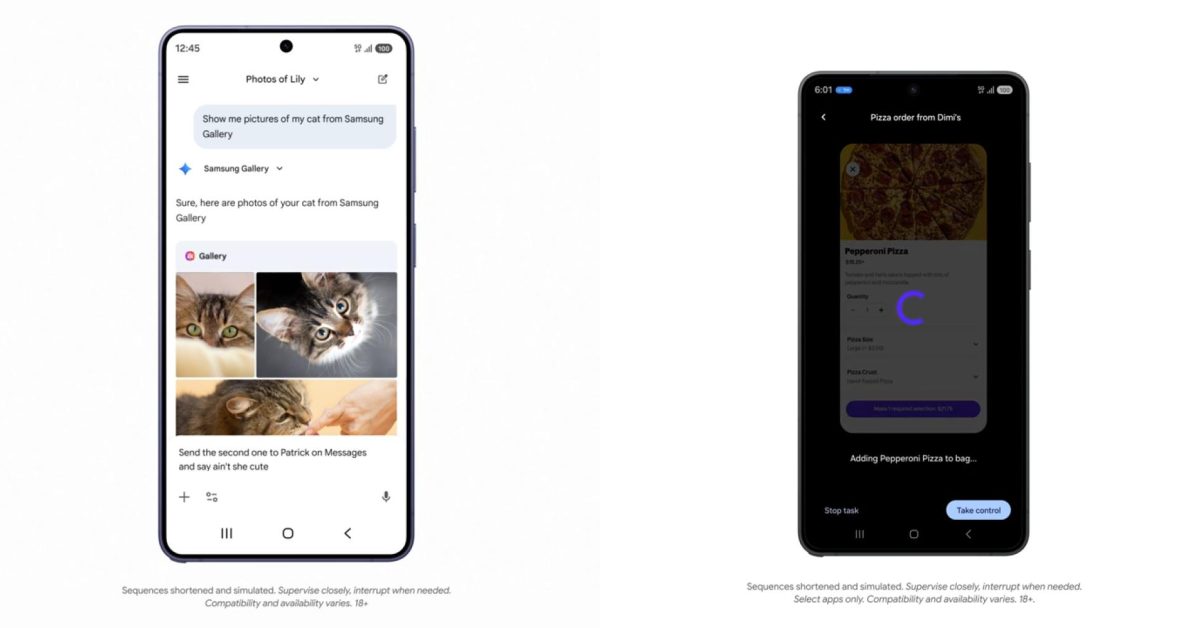
Check out how AppFunctions integrates with the Samsung Gallery app on the upcoming Galaxy S26. This feature is also planned for Samsung devices running OneUI 8.5 and newer.
Instead of endlessly scrolling, you can simply ask Gemini to “Show me pictures of my cat from Samsung Gallery.” Gemini understands the request, triggers the correct function within the Gallery app, and presents the photos directly within the Gemini interface – no app switching required! This seamless experience supports both voice and text input, and you can even use the displayed photos in subsequent conversations, such as sharing them via text message.
Google anticipates that Android 17 will “expand these capabilities, reaching a broader audience of users, developers, and device manufacturers.”
We’re currently collaborating with a select group of app developers to create exceptional user experiences as this ecosystem evolves. We plan to share more details later this year on how you can leverage AppFunctions and UI automation to integrate agentic capabilities into your app. Stay tuned for further updates!